

AI WORKFLOW - TESCO ONECEC
Designing trusted AI workflows for millions of customer conversations.
The hard part was never the summary, it was deciding how far to trust the machine that wrote it.
Introducing human-in-the-loop AI into Tesco’s Customer Engagement platform, reducing operational effort while improving data quality, compliance and colleague trust.
Customer Engagement Centre · Senior Product Designer · AI Workflow · Enterprise Platform
01 - CONTEXT
Customer conversations create valuable data. Capturing it was the hard part.
Tesco CEC colleagues handle around 9 million customer conversations every year across Grocery, Delivery and Clubcard. Each interaction contains valuable insight, but capturing this relied on colleagues manually documenting every conversation after the call.
Guidance said log the contact during the call. Almost nobody did, listening, resolving and typing a structured note at once is too much load, so people solved the problem first and reconstructed the note from memory. That cost about 102 seconds a call, made records uneven, and meant only ~23% of interactions were ever logged. The rest of the customer's story evaporated.
THE PREVIOUS EXPERIENCE

PAINT POINTS
-
Time consuming
-
Inconsistent data
-
Cognitive load
-
Missing insights
02 - THE CHALLENGE
AI could write summaries. The harder question was whether colleagues would trust them.
The model could already produce serviceable text, that was never the problem. The real work was operational: how do you put AI inside a live, high-volume workflow without people losing trust, accuracy or control over a record they're personally accountable for?
TRUST
Did it understand?
How does a colleague know the AI actually grasped the call, not just produced fluent text?
CONTROL
Complete, or assist?
Should the AI finish the task on its own, or hand a draft to a person who decides?
ADOPTION
Without breaking things
How do you add AI to a workflow thousands of colleagues already rely on, daily?
03 - MY ROLE
Leading the experience strategy.
I led the end-to-end design across discovery, research, experience design and delivery.
Discovery
Mapped the real colleague workflow and where it diverged from official guidance.
Research & validation
Tested AI concepts in interviews and usability sessions to learn what built trust.
Experience design
Defined the human-in-the-loop interaction pattern and the contact-log UI.
Delivery
Shipped the assistant inside OneCEC with engineering and data science.


04 — RESEARCH INSIGHT
Speed mattered. Control created trust.
"AI saves time, but I still need to make sure the information is correct"
— Customer Engagement colleague
COLLEAGES WANTED
Faster logging
Less repetitive admin
Summaries they can edit
Final ownership of the record
COLLEAGES DIDN'T WANT
Invisible automation
AI saving without them
Losing their own judgement
Rigid, locked outputs
05 — THE KEY DESIGN DECISION
From automation to augmentation.
I explored fully automated summaries, manual generation, and a review-and-edit loop. The tempting one, AI writes the note and saves it, tested best on a stopwatch and worst on everything that mattered.
AI automated
Colleague controls
Rejected — automation

The problems
-
Low transparency
-
Lower confidence
-
No clear owner
In a regulated, customer-facing context, “the AI did it” is not an answer when a record is wrong.
Chosen — augmentation
AI drafts. The colleague decides.

1. Generate when ready
A manual trigger matched how colleagues already worked.
2. Editable output
They review, edit and personalise before anything saves.
3. Fits the existing flow
It lives in the contact log they already use, no new tool.
The whole project is one shift, from the AI deciding to the AI drafting. Slightly more steps, far more trust.
06 — THE SOLUTION
An assistant embedded in the workflow, no new tool.
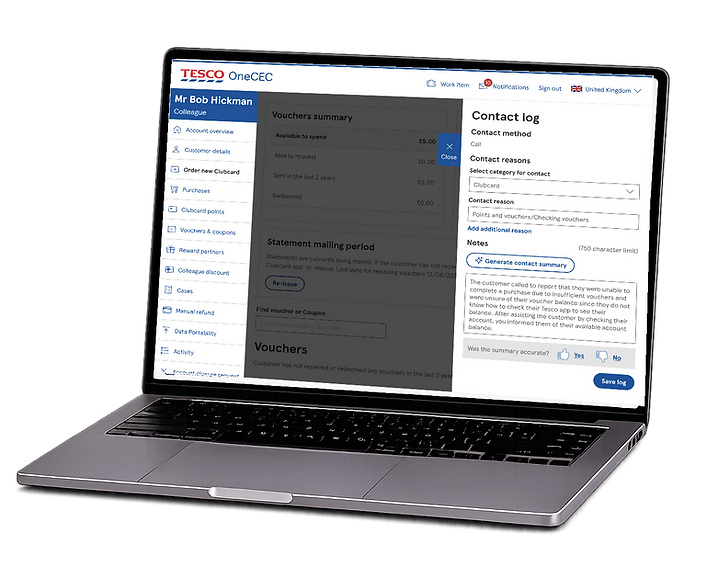
The summariser lives directly in the OneCEC Contact Log. No second screen, no context-switch at wrap-up. The draft lands in the fields colleagues already fill, editable in place, with their Submit as the single, deliberate sign-off.
Redesigned
PHASE 1
Connect
PHASE 2
Identify
PHASE 3
Resolve
PHASE 4
Log
PHASE 5
Close
BEFORE - MANUAL WRAP UP
~ 102s
The colleague carries all of it.
-
Recall the conversation
From memory, after the call has ended -
Open the contact log
-
Choose a category
-
Type up the note
-
Submit
AFTER- AI ASSISTED
~ 34.5s
IN THE BACKGROUND, DURING THE CALL
The AI listens, then drafts a summary
The draft is already waiting.
-
Open the contact log
Click the ai assisted button -
Review the draft
A check, not a recall — the moment trust is earned -
Edit if needed
-
Submit.
The colleague's sign-off
Demo Clucard Replacement - AI Summarisation
07 - IMPACT
What human-centred AI unlocked.
The same workflow, re-weighted toward the human. Faster wrap-up and, quieter but bigger, far more of the customer finally getting recorded.
102→34.5sec
AVERAGE WRAP UP
Roughly 66% less post-call admin — about 70 seconds back on every interaction.
100hrs / day
COLLEAGUE TIME RETURNED
More than a hundred agent hours saved across the centre, every single day, around £1m of annual operational value.
23→47%
INTERACTION LOGGED
Roughly double the customer insight captured, the strategic win underneath the efficiency one.
~95% successful AI summary generation - tested for completeness, accuracy & usefulness
08 — WHAT THIS UNLOCKED
Beyond efficiency, a foundation.
More complete interaction data helps Tesco understand why customers get in touch recurring issues, friction, and where to improve the service next.
Richer customer insight
Twice the interaction data feeding everything downstream.
Improved compliance
A clear human sign-off on every saved record.
Better decision-making
Consistent records leaders can actually act on.
A reusable AI pattern
Human-in-the-loop the platform can extend to its next capability.
09 - REFLECTION
Designing AI is designing trust. The challenge was never teaching it to summarise, it was designing the relationship between the AI and the colleagues who answer for its output.
Get it right, draft, don't decide; assist, don't replace, and the efficiency follows on its own. Get it wrong and you ship something fast that nobody trusts enough to use. Every number on this page is downstream of that one judgement call.
